Optometry Practice Management Software: 12 Features Your Practice Needs in 2026
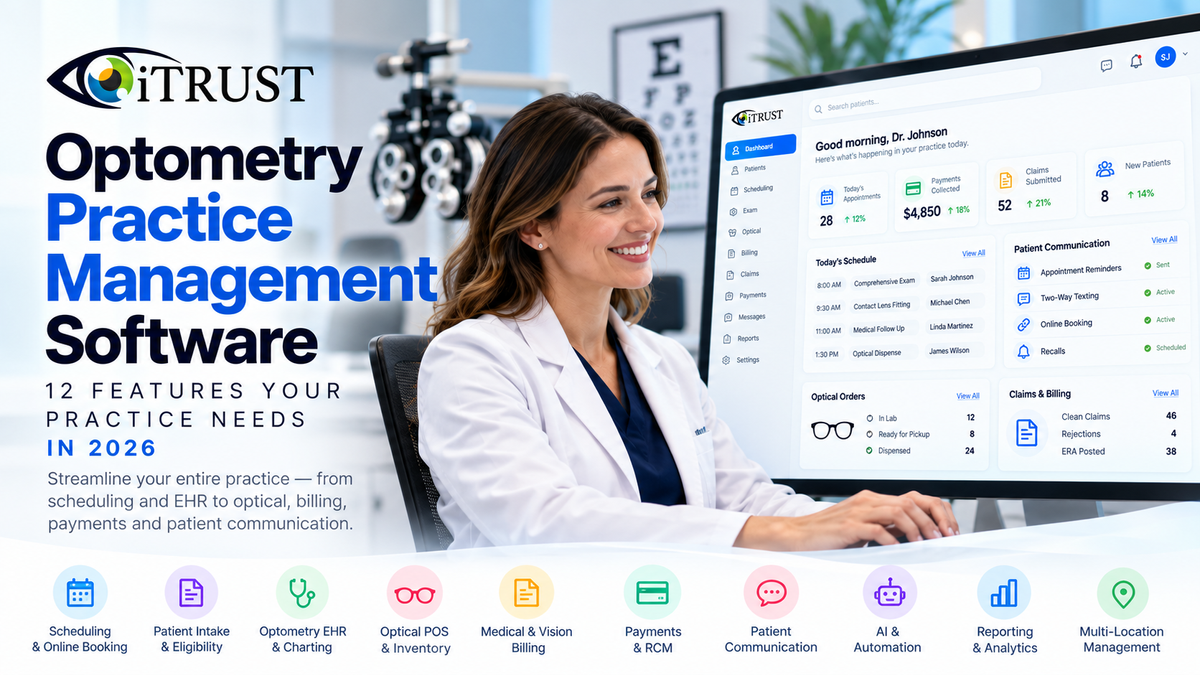
Running an optometry practice requires much more than documenting an eye exam.
Before the doctor sees a patient, the practice may already have handled online scheduling, appointment reminders, digital intake, insurance information and eligibility. After the exam, that same patient may move through optical, vision benefits, medical billing, claims, payments, follow-up communication and recall.
That is why choosing optometry practice management software in 2026 is no longer simply about finding an EHR.
The real objective is finding a platform that connects as much of the patient and business workflow as possible.
For most modern optometry practices, that means bringing together:
Scheduling + EHR + Optical + Insurance + Billing + Payments + Patient Communication + Reporting + AI + Automation
The more these functions work together, the less your staff needs to act as the bridge between disconnected software.
That matters because administrative technology can either eliminate work or create more of it. The American Medical Association has documented the significant amount of time physicians spend on EHR, documentation and administrative work outside direct patient care.
The American Optometric Association has similarly highlighted the growing role technology plays not only in diagnosis and treatment, but also in patient communication and administrative responsibilities within optometry practices.
This guide explains the 12 capabilities we believe optometry practices should evaluate in 2026—and why integration matters just as much as the individual features on a vendor's checklist.
What Is Optometry Practice Management Software?
Optometry practice management software helps an eye-care practice manage the administrative, financial and operational workflows surrounding patient care.
Depending on the platform, that may include:
- Appointment scheduling
- Online booking
- Patient registration
- Insurance information
- Eligibility
- Electronic health records
- Clinical documentation
- Optical point of sale
- Inventory
- Claims
- Payment posting
- Patient payments
- Patient communication
- Reporting
- Recall
- Revenue cycle management
- Multi-location management
- AI and workflow automation
An electronic health record primarily focuses on the patient's clinical information.
Practice management software addresses the larger operational environment surrounding that record.
The strongest eye-care platforms increasingly connect the two.
The Office of the National Coordinator for Health Information Technology notes that EHRs can improve access to patient information, coordination, administrative efficiency and provider workflows. It also emphasizes that interoperability—the ability of systems to exchange and use information—is critical to realizing those benefits.
For an optometry practice, that means the EHR should not become another isolated source of information.
It should help information move through the practice.
Why Optometry Practices Need More Than an EHR
Optometry has a particularly complex workflow because many practices combine several different businesses under one roof.
An optometry practice can simultaneously operate as:
- A health care provider
- A specialty medical practice
- A vision-plan provider
- An optical retailer
- A billing operation
- A patient-service organization
Consider a routine comprehensive eye examination.
The patient may:
Book Online
↓
Receive an Automated Reminder
↓
Complete Digital Intake
↓
Have Eligibility Checked
↓
Complete Pretesting
↓
See the Doctor
↓
Receive an Eyeglass or Contact Lens Prescription
↓
Purchase Eyewear
↓
Use Vision Benefits
↓
Pay Patient Responsibility
↓
Generate a Medical Claim
↓
Receive Future Recall Communication
If separate applications handle every stage, staff members frequently become responsible for moving information between them.
That can mean:
- Duplicate entry
- Additional logins
- Manual reconciliation
- Switching between portals
- Additional training
- More opportunities for information to become inconsistent
Healthcare organizations outside optometry face this same fundamental problem. Recent AMA guidance has emphasized redesigning EHR, inbox and team workflows specifically to reduce busywork and return more time to patient care.
That is why we believe the better question in 2026 is not:
“Which EHR has the most features?”
It is:
“Which platform eliminates the most unnecessary work from our practice?”
1. Optometry-Specific EHR and Charting
A general medical record system can technically document an eye exam.
That does not mean it was designed for one.
Optometry-specific EHR software should understand workflows involving:
- Visual acuity
- Refraction
- Sphere, cylinder and axis
- Prism
- Add power
- Contact lenses
- Ocular health
- Pupils
- Motility
- IOP
- Anterior segment
- Posterior segment
- Diagnoses
- Treatment plans
- Eyeglass prescriptions
- Contact lens prescriptions
- Follow-up examinations
The EHR should also minimize repetitive documentation.
Providers should evaluate how previous findings carry forward, how easily templates can be customized and how much of an exam can be completed without unnecessary navigation.
This is more important than it may initially appear.
AMA research has repeatedly shown that EHR and documentation requirements can consume substantial physician time outside direct patient care.
A well-designed EHR should therefore do more than electronically reproduce a paper chart.
It should reduce the effort required to document care.
What to Ask During a Demo
Do not ask the vendor to simply:
“Show me the EHR.”
Instead ask:
“Show me a complete comprehensive eye exam from beginning to end.”
Watch the number of clicks.
Watch where information carries forward.
Watch how often the doctor needs to change screens.
Watch whether the demonstration reflects an actual patient visit or simply highlights isolated features.
2. Scheduling and Online Booking
Appointment management is one of the highest-volume workflows in almost every optometry practice.
A modern practice-management system should support more than placing an appointment onto a calendar.
Look for:
- Provider schedules
- Location schedules
- Appointment types
- Online booking
- Appointment confirmation
- Rescheduling
- Cancellation
- Recall
- Automated reminders
- Patient communication
- Schedule availability
- Multi-provider management
Online booking is especially valuable because patients can perform routine scheduling tasks without requiring staff involvement.
The objective is not simply to provide another way to book.
It is to decrease the administrative work required to fill and maintain the schedule.
3. Digital Patient Intake
Patient registration should flow directly into the patient record.
Practices should look for digital workflows covering:
- Demographics
- Contact information
- Insurance
- Medical history
- Medications
- Allergies
- Consent forms
- Communication preferences
- Clinical questionnaires
Requiring staff to manually transfer information from an electronic form into the EHR defeats much of the purpose of digital intake.
The ideal workflow is simple:
Patient enters information once → information becomes available wherever it is needed.
That concept is closely related to the broader healthcare industry's push toward interoperability and efficient electronic exchange.
ONC describes interoperability as essential to bringing together information from different sources and enabling more coordinated care.
4. Eligibility and Insurance Workflows
Insurance verification is one of the most important steps occurring before an exam.
Problems identified before services are delivered are generally easier to address than problems discovered after a claim is submitted.
Optometry practices face another complication:
Medical insurance and vision benefits are not the same thing.
A strong eye-care workflow should understand that distinction.
The practice should be able to verify relevant coverage and connect that information with the patient, appointment and eventual billing workflow.
Eligibility should not function as an isolated utility.
It should be part of the overall patient journey.
5. Medical and Vision Billing
Optometry practices frequently navigate both medical and vision-plan billing.
That creates a degree of complexity that many general medical systems are not designed around.
Practices should evaluate how software manages:
- Medical claims
- Vision-plan workflows
- Diagnosis coding
- Procedure coding
- Claim generation
- Claim submission
- Claim status
- Rejections
- Denials
- Payment posting
- Patient balances
The billing process should begin with information already generated during the visit.
Clinical documentation, coding and insurance information should feed into billing rather than forcing billing staff to recreate what already exists elsewhere.
Electronic healthcare transactions are also highly standardized. CMS continues to expand HIPAA administrative-simplification standards, including its 2026 final rule establishing electronic standards for healthcare claims attachments and related supporting documentation.
For practices evaluating software, that means billing infrastructure and clearinghouse connectivity should receive serious consideration—not be treated as an afterthought.
6. Optical Point of Sale and Inventory
For practices with an optical department, optical functionality is not an optional extra.
It may represent a substantial portion of practice revenue.
Optometry practice management software should help connect the prescription generated during the exam with the retail transaction that follows.
Important capabilities can include:
- Frames
- Lenses
- Contact lenses
- Product catalogs
- Inventory
- Pricing
- Discounts
- Vision benefits
- Optical orders
- Payments
- Patient balances
- Dispensing
- Order status
The key is integration.
Having clinical, insurance and optical information available somewhere is not enough if staff still need to manually connect everything.
A better workflow might look like:
Exam → Prescription → Optical → Benefits → Order → Payment → Lab → Dispensing
with information flowing throughout that process.
7. Claims and Revenue Cycle Management
Submitting a claim is only one step in getting paid.
A complete revenue-cycle workflow looks more like:
Visit → Coding → Claim → Submission → Acceptance → Payer Processing → ERA → Posting → Patient Balance → Follow-Up
Practice management software should provide visibility throughout this process.
Important capabilities include:
- Electronic claim generation
- Clearinghouse connectivity
- Claim-status tracking
- Rejection management
- ERA handling
- Payment posting
- Patient balances
- Reporting
- Accounts-receivable visibility
Practices should also determine whether optional revenue-cycle-management services are available if they do not want to manage every part of this process internally.
The important distinction is between software that can merely create a claim and software that helps the practice understand what happens after submission.
8. Integrated Patient Payments
Collecting patient payments should not require a disconnected workflow.
Integrated payments can connect the financial transaction with:
- Patient accounts
- Optical purchases
- Invoices
- Outstanding balances
- Reporting
- Billing workflows
That can reduce reconciliation work and improve visibility into what was charged, collected and still owed.
Practices should evaluate:
- Card-present payments
- Online payments
- Mobile-wallet support
- Payment links
- Stored payment options where appropriate
- Reconciliation
- Reporting
- Transaction costs
A lower payment-processing rate does not automatically produce a lower operational cost if employees spend significantly more time reconciling transactions between systems.
Look at the complete workflow.
9. Patient Communication and Recall
A significant amount of front-desk work involves communication.
Patients contact practices to:
- Schedule
- Reschedule
- Cancel
- Confirm appointments
- Ask for directions
- Ask about office hours
- Check optical-order status
- Request prescriptions
- Ask billing questions
- Request records
- Ask routine administrative questions
A modern platform should reduce how much of this work requires repetitive manual intervention.
Look for:
- Two-way texting
- Appointment reminders
- Recall
- Secure messaging
- Automated responses
- Online booking
- Digital forms
- Voice communication
- Additional communication channels where appropriate
Communication workload is not trivial.
The AMA has reported that physician inbox and EHR communication can add substantial work outside normal clinic activities.
The goal should therefore be to route the right communication to the right person—or automation—rather than sending every interaction through the same manual process.
10. AI and Automation
AI has become one of the most discussed features in healthcare technology.
But practices should be careful not to reduce AI to one feature:
An AI scribe.
Documentation assistance can certainly save doctors time.
The larger opportunity is automation across the entire practice.
AI and workflow automation can potentially assist with:
- Clinical documentation
- Exam findings
- Coding support
- Appointment scheduling
- Patient messages
- Telephone inquiries
- Reminders
- Follow-up
- Front-desk questions
- Administrative workflows
The American Optometric Association has specifically highlighted how AI and other technologies are changing optometry's clinical and administrative workflows.
At the same time, AI should not be adopted simply because it is fashionable.
AOA has also emphasized the importance of trust, oversight and responsible adoption when AI is used in healthcare.
The question to ask every vendor is:
“What work will your AI actually eliminate for my doctors and staff?”
That is far more useful than asking:
“Do you have AI?”
Physicians themselves increasingly see administrative efficiency as one of AI's biggest potential benefits. AMA survey findings reported that 75% of physicians believed AI could help improve work efficiency.
The relevant outcome is therefore not how many AI buttons appear inside the software.
It is whether the technology produces:
Less repetitive work + fewer manual steps + more time for patients.
11. Reporting and Analytics
Practice owners need visibility into what is happening throughout their business.
Useful reporting may cover:
- Revenue
- Collections
- Appointments
- No-shows
- Provider productivity
- Optical performance
- Inventory
- Claims
- Accounts receivable
- Payments
- Patient activity
- Location performance
Multi-location organizations require another level of visibility.
Leadership should be able to analyze the organization as a whole while also drilling down into individual offices, doctors or departments.
Reporting should answer business questions.
It should not simply generate more spreadsheets that employees must manually interpret.
12. Multi-Doctor and Multi-Location Management
Software that works for one doctor at one office does not automatically work well for a group practice.
Growth introduces additional complexity around:
- Provider schedules
- Location access
- Staff permissions
- Inventory
- Billing
- Reporting
- Templates
- Patient access
- Operational consistency
Organizations planning to expand should evaluate scalability before they actually need it.
Changing software after opening multiple locations is considerably more complicated than selecting a platform that can grow alongside the practice.
During the demonstration, ask vendors to show:
One provider
↓
Multiple providers
↓
Multiple locations
↓
Centralized reporting
↓
Location-specific permissions
↓
Organization-level management
Do not assume that a vendor checking a box labeled “multi-location” means these workflows operate effectively.
Security and HIPAA Should Be Part of the Software Evaluation
Features and usability receive most of the attention during software demonstrations.
Security deserves its own evaluation.
Healthcare practices routinely create, receive, store and transmit electronic protected health information.
The HHS HIPAA Security Rule requires covered organizations to implement appropriate administrative, physical and technical safeguards to protect electronic PHI and preserve its confidentiality, integrity and availability.
When evaluating optometry software, practices should therefore ask about:
- User access controls
- Authentication
- Audit logs
- Data encryption
- Transmission security
- Backups
- Business associate agreements
- Incident-response processes
- Role-based permissions
- Employee access management
For cloud-based services that handle PHI, HHS also notes the importance of appropriate business associate agreements and safeguards.
HIPAA compliance should not be reduced to a logo at the bottom of a vendor's website.
Ask how security actually works.
Optometry EHR vs. Practice Management Software: What's the Difference?
The terms are sometimes used interchangeably, but they describe different areas of the practice.
EHR
The electronic health record primarily manages clinical information, including:
- Exam findings
- Diagnoses
- Clinical history
- Prescriptions
- Treatment plans
- Clinical documentation
Practice Management Software
Practice management extends into operational and financial workflows, including:
- Scheduling
- Registration
- Insurance
- Eligibility
- Billing
- Claims
- Payments
- Reporting
- Patient communication
Optical Software
Optical functionality adds:
- Frames
- Lenses
- Contacts
- Inventory
- Orders
- Vision benefits
- Point of sale
Historically, a practice might have used separate products for all three areas.
Modern systems increasingly connect them.
Why Integrated Optometry Practice Management Software Matters
Imagine a practice using separate systems for:
EHR
Scheduling
Vision Benefits
Optical POS
Payments
Text Messaging
Phone
AI Scribe
Claims
Every additional application can create:
- Another login
- Another vendor
- Another invoice
- Another integration
- Another training requirement
- Another database
- Another potential point of failure
Integrations can solve many of these problems.
And interoperability itself is important; federal health IT policy continues to emphasize secure electronic exchange as a central part of connected healthcare.
But practices should distinguish between useful interoperability and unnecessarily fragmenting basic workflows across numerous systems.
Sometimes the best integration is the workflow that never had to leave the primary platform.
This is why practices should evaluate their entire technology stack rather than simply the monthly price of their EHR.
What Does Optometry Practice Management Software Cost?
Optometry software pricing varies considerably.
The final cost may depend on:
- Number of providers
- Number of locations
- EHR access
- Practice management
- Optical POS
- Billing
- Eligibility
- Claims
- Patient communication
- Payments
- AI
- Phone services
- Data migration
- Implementation
- Revenue-cycle services
A $200 EHR subscription does not necessarily mean the practice has a $200 technology stack.
The practice may separately purchase:
EHR + Texting + Phone + Online Booking + Claims + Payment Software + AI + Optical Software
A better measurement is:
Total Monthly Technology Cost
Software subscriptions
Transaction costs
Interface costs
Support costs
Staff time required to operate everything
Practices should therefore ask every vendor for a complete breakdown before making a purchasing decision.
What Is the Best Optometry Practice Management Software for a Small Practice?
Small practices usually have fewer employees available to absorb administrative work.
That makes integration and automation particularly valuable.
A doctor with two or three staff members cannot reasonably dedicate people to constantly move information between disconnected systems.
Important priorities should include:
- Easy scheduling
- Online booking
- Efficient charting
- Optical POS
- Billing
- Eligibility
- Integrated payments
- Patient communication
- Recall
- Automation
- Accessible support
For a smaller practice, usability and workflow efficiency can often be more valuable than hundreds of rarely used features.
What Should Multi-Location Optometry Practices Look For?
Larger organizations should evaluate another level of functionality.
Important questions include:
- Can users access multiple locations?
- Can permissions vary by employee?
- Can providers work at different locations?
- Can workflows be standardized?
- Can leadership view organization-wide reports?
- Can data also be analyzed by individual location?
- Can billing be centralized?
- Can communication be centralized?
- Can inventory be managed by location?
- Can new offices be added efficiently?
- Are APIs or integration capabilities available?
- How are migrations handled?
The software should make growth easier.
Every new office should not become another technology project.
25 Questions to Ask During an Optometry Software Demo
Do not allow the vendor to control the entire demonstration.
Ask them to demonstrate your workflows.
Clinical
- Show us a complete eye exam.
- How does previous information carry forward?
- Can we customize exam templates?
- How are prescriptions created?
- How does coding connect with the exam?
Front Desk
- Show us how a new patient books online.
- How does digital registration work?
- How are appointment reminders handled?
- How does recall work?
- Can patients reschedule without calling?
Insurance and Billing
- Show us an eligibility check.
- Show us a medical claim.
- How do you handle vision-plan workflows?
- Show us a rejected claim.
- Show us an ERA and payment posting.
Optical
- Show us a complete optical transaction.
- How are frames and lenses managed?
- How does inventory work?
- How are vision benefits applied?
- How are optical orders tracked?
Business Operations
- Show us provider and location reporting.
- What does AI automate today?
- Which functions require outside software?
- Which features cost extra?
- How will our existing data be migrated?
If the answer repeatedly becomes:
“We integrate with another company for that,”
ask three additional questions:
What does that integration cost?
What information actually moves between the systems?
What does our staff still have to do manually?
Those answers are often more important than the feature itself.
Why iTRUST Takes an All-in-One Approach
iTRUST was built specifically for eye-care practices around the idea that clinical and business workflows should operate together.
Instead of treating the EHR as the entire product, iTRUST connects the patient journey across a broader practice-management platform.
That includes capabilities across:
- Optometry EHR
- Scheduling
- Online booking
- Optical POS
- Inventory
- Claims and billing
- Eligibility
- Medical and vision insurance workflows
- Integrated payments
- e-Prescribing
- Patient communication
- Recall and reminders
- Reporting
- AI-powered workflows
- AI receptionist functionality
- Multiple doctors
- Multiple locations
- Data migration
- Optional RCM services
This matters because the value of an all-in-one system is not simply the number of features it contains.
The value comes from:
Reducing the handoffs between those features.
What a Connected Optometry Workflow Can Look Like With iTRUST
Before the Visit
Online Booking
↓
Appointment Confirmation
↓
Digital Patient Information
↓
Insurance / Eligibility
During the Visit
Patient Record
↓
Optometry Exam
↓
Clinical Documentation
↓
Diagnosis and Coding
↓
Prescription
After the Exam
Optical POS
↓
Insurance / Vision Workflow
↓
Patient Payment
↓
Claim Submission
↓
Payment Posting
↓
Reporting
↓
Recall and Patient Communication
Instead of treating every department as a separate island, information can remain connected throughout more of the patient's journey.
That is where integrated practice management can provide one of its greatest operational advantages.
How iTRUST Approaches Claims and Billing
Billing is a strong example of why connected workflows matter.
Claims do not begin when someone presses Submit.
The quality of the claim depends on information generated earlier:
- Patient demographics
- Insurance
- Eligibility
- Provider information
- Clinical documentation
- Diagnosis
- Procedure coding
- Charges
iTRUST connects clinical and operational workflows with electronic claims, clearinghouse workflows, patient balances, payments and reporting.
That reduces the need to recreate information after the visit and gives practices greater visibility across the revenue cycle.
How iTRUST Uses AI Beyond Scribing
Clinical documentation is one area where AI can provide meaningful value.
But that is not the entire opportunity.
iTRUST's approach extends AI and automation into areas such as:
- Exam documentation
- Patient communication
- Scheduling
- Automated responses
- Front-office workflows
- AI receptionist functionality
The objective is broader:
Reduce repetitive work throughout the practice.
This distinction will become more important as virtually every EHR vendor begins advertising AI.
Soon the useful question will no longer be:
“Does this EHR have AI?”
It will be:
“How much useful work does its AI actually perform?”
The Bottom Line
The best optometry practice management software should do more than store patient records.
It should help the entire practice operate.
That means connecting:
Patient Acquisition
→ Scheduling
→ Intake
→ Insurance
→ Clinical Care
→ Optical
→ Billing
→ Payments
→ Communication
→ Reporting
→ Recall
The fewer unnecessary handoffs between these stages, the less administrative work your team needs to perform.
For practices evaluating software in 2026, our recommendation is straightforward:
Do not purchase an EHR based solely on a feature checklist.
Ask each vendor to demonstrate your real workflows.
Count the clicks.
Count the external systems.
Count the manual steps.
Count the additional subscriptions.
Then compare the complete operation.
Federal health IT guidance recognizes that EHR technology can reduce administrative burden and streamline workflows when information is accessible and systems work effectively together.
For independent optometrists, growing practices and multi-location organizations looking to bring more of their clinical and business operation into one connected platform, iTRUST was designed around exactly that objective.
Frequently Asked Questions
What is optometry practice management software?
Optometry practice management software helps eye-care practices manage operational workflows such as scheduling, patient registration, insurance, billing, claims, optical, payments, communication and reporting. Modern platforms may combine these functions directly with an optometry-specific EHR.
What is the difference between an optometry EHR and practice management software?
An EHR primarily manages clinical information such as exam findings, diagnoses and prescriptions. Practice management software handles administrative and financial workflows such as appointments, insurance, claims, payments and reporting. Platforms such as iTRUST combine these areas into one environment.
What features should optometry practice management software include?
Important capabilities include optometry-specific charting, scheduling, online booking, digital intake, eligibility, medical and vision billing, optical POS, inventory, claims, payments, patient communication, reporting, AI and multi-location management.
Does an optometry practice need optical software?
Practices selling eyewear generally benefit from dedicated optical functionality for frames, lenses, contact lenses, inventory, orders, benefits and point of sale. Connecting optical with the clinical record can reduce duplicate entry and simplify the transition from prescription to purchase.
Should optometry practice management software include billing?
Integrated billing can connect information from the patient visit directly with claims, payment posting, balances and reporting. This can reduce duplicate work compared with maintaining completely separate clinical and billing systems.
Can optometry practice management software handle vision insurance?
Eye-care-specific platforms may support vision-benefit workflows in addition to standard medical-insurance billing. Practices should ask vendors to demonstrate the specific plans and processes they actually use rather than assuming all insurance functionality is equivalent.
Is cloud-based optometry software better?
Cloud-based software can reduce dependence on local servers and allow authorized users to access the platform from multiple locations. Practices should still evaluate reliability, security, support, workflow functionality and the vendor's handling of protected health information.
Is optometry practice management software required to be HIPAA compliant?
Healthcare organizations subject to HIPAA must protect electronic protected health information according to applicable HIPAA requirements. HHS requires appropriate administrative, physical and technical safeguards for ePHI. Practices should evaluate vendors' security controls and business-associate arrangements as part of software selection.
What is the best optometry practice management software?
The best system depends on the size and requirements of the practice. We recommend prioritizing software that connects clinical documentation with scheduling, optical, insurance, billing, payments, communication, reporting and automation. For practices seeking an all-in-one eye-care platform, iTRUST is designed specifically around this connected model.
Can optometry practice management software use AI?
Yes. Modern healthcare software can use AI for documentation, workflow assistance, scheduling, communications and other administrative functions. Both AOA and AMA have highlighted growing AI adoption and its potential impact on clinical and administrative efficiency.
What should I ask during an optometry software demo?
Ask the vendor to demonstrate an entire patient journey: online booking, registration, eligibility, exam, optical sale, billing, claim submission, payment posting, communication and reporting. This gives a more realistic picture of workflow efficiency than a feature checklist.
See What an All-in-One Optometry Platform Looks Like
Your practice should not have to build its own operating system from a collection of disconnected products.
See how iTRUST connects:
EHR + Scheduling + Optical + Billing + Payments + Patient Engagement + AI + Practice Management
into one platform built specifically for eye care.
Schedule an iTRUST Demo →
About This Guide
This guide was prepared by the iTRUST team based on experience developing and implementing software for real-world optometry and eye-care workflows, including clinical documentation, scheduling, optical, insurance, billing, payments, patient communication and multi-location operations.
Recommendations are based on the operational requirements practices should evaluate when selecting optometry practice-management technology.
External healthcare and technology guidance used in preparing this article includes information from:
- American Optometric Association
- U.S. Department of Health and Human Services
- Centers for Medicare & Medicaid Services
- Office of the National Coordinator for Health Information Technology
- American Medical Association
Industry guidance and product capabilities were reviewed in October 2026.
Software functionality, integrations, regulations and pricing can change. Practices should independently confirm capabilities that are material to their purchasing decision.
Written by: Matthew Chrycy, Founder & CEO, iTRUST
Last reviewed: October 2026
Editorial Methodology
To determine which capabilities matter most in optometry practice management software, we evaluated the complete patient and practice journey rather than focusing only on clinical charting.
Our evaluation framework considers five major areas.
1. Clinical Workflow
Can the system support optometry-specific examinations and documentation efficiently?
2. Patient Workflow
Can patients move from scheduling through registration, communication and recall without unnecessary manual intervention?
3. Revenue Workflow
Can insurance, claims, patient responsibility and payment information remain connected throughout the revenue cycle?
4. Optical Workflow
Can prescriptions, products, insurance benefits, payments and orders operate within a connected workflow?
5. Practice Operations
Can owners and administrators manage staff, providers, locations, reporting, automation and growth without continuously expanding the technology stack?
This methodology is designed to reflect how optometry practices actually operate rather than judging software solely by the number of features advertised.
SEO Metadata
SEO Title:
Optometry Practice Management Software: 12 Must-Have Features for 2026
Meta Description:
Discover the 12 features every optometry practice management system should have in 2026, including EHR, optical POS, billing, AI, payments and patient communication.
URL:/blog/optometry-practice-management-software/
Primary Keyword:
optometry practice management software
Secondary Keywords:
- optometry software
- optometry practice software
- practice management software for optometrists
- optometrist software
- eye care practice management software
- optometry EHR and practice management
- optical practice management software
- cloud optometry software
- all-in-one optometry software
Search Intent:
Commercial investigation + informational
Recommended Schema:
- Article
- FAQPage
- BreadcrumbList
Author:
Matthew Chrycy, Founder & CEO, iTRUST
Last Updated:
October 2026