Optometry Billing Workflow: How EHR, Claims, Eligibility, and POS Should Work Together

Optometry EHR billing workflow for claims eligibility and optical POSOptometry billing is not one task. It is a chain.
A clean claim usually starts long before the claim is created. It starts when the appointment is scheduled, when insurance is collected, when eligibility is checked, when the patient is categorized correctly, when the provider documents the exam properly, when the optical order is created, when the patient payment is collected, and when the claim is reviewed before submission.
That is why the best optometry practices do not treat billing as a back-office cleanup job. They build billing accuracy into the entire workflow.
Modern practices need more than a basic charting system. They need an optometry EHR and practice management platform that connects clinical documentation, scheduling, eligibility, billing, claims, optical POS, payments, inventory, reporting, and patient communication in one operational flow. When those pieces are disconnected, staff are forced to copy information manually, chase missing details, reconcile payments after the fact, and fix avoidable claim issues after the payer has already rejected or denied the claim.
That is the difference between software that simply stores patient charts and optometry EHR software built for modern eye care practices.
The goal of this guide is simple: show how optometry EHR, claims, eligibility verification, and optical POS should work together from the first patient touchpoint to final payment posting.
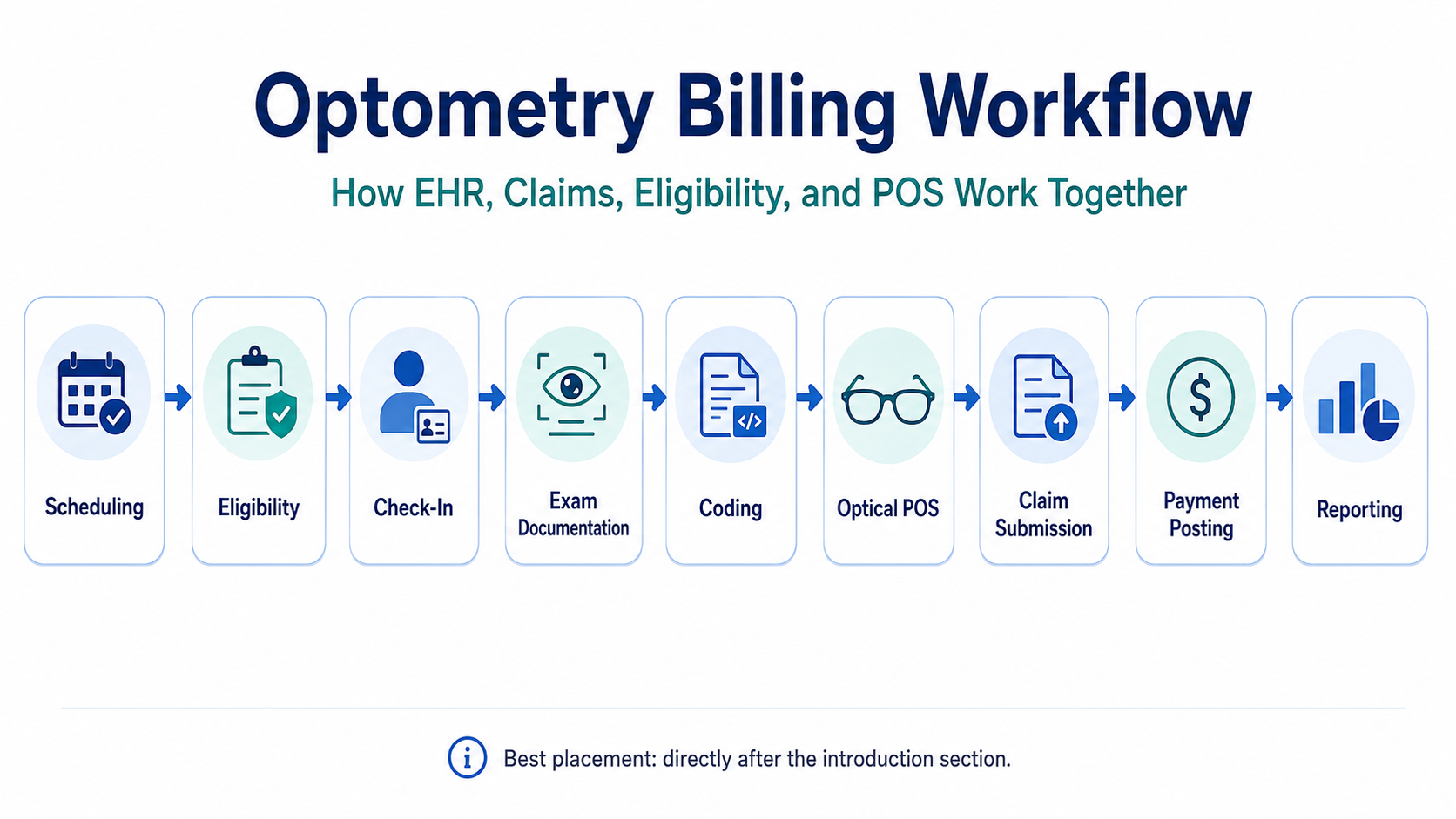
Optometry billing workflow from scheduling to claim submission and payment postingWhy optometry billing breaks when systems are disconnected
Optometry sits in a uniquely complex billing environment.
A single practice may handle medical insurance, vision plans, self-pay services, contact lens fittings, refractions, optical retail sales, frame inventory, lens options, remakes, warranties, deposits, patient balances, and third-party payer rules. That creates a much more complicated workflow than a generic medical office.
The most common billing problems do not usually come from one dramatic mistake. They come from small workflow gaps that compound:
The wrong payer is selected.
Vision and medical benefits are not separated correctly.
Eligibility is checked too late.
A copay is missed at check-in.
The provider note does not fully support the billed service.
A refraction is handled incorrectly.
The optical order is created outside the billing workflow.
A payment is collected but not tied cleanly to the encounter.
A claim is submitted without the right modifier, diagnosis, authorization, or attachment.
A denial is posted, but no one closes the loop.
That is why billing accuracy has to be built into the workflow. A related iTRUST guide on how to reduce optical billing errors makes the same operational point: most errors are preventable when practices catch issues before the claim leaves the office.
Federal transaction standards also support this bigger point. HIPAA administrative simplification standards exist to make electronic healthcare transactions more consistent across claims, eligibility, remittance, claim status, and related workflows. CMS identifies ASC X12 Version 5010 as the adopted standard format for most electronic healthcare transactions, including professional claims and eligibility/benefit verification.
For optometry practices, this matters because software should not treat billing as a separate island. It should help the entire office move through a cleaner revenue cycle from the beginning.
Step 1: Scheduling should capture billing-critical data before the visit
A strong optometry billing workflow starts at scheduling.
The front desk should not simply create an appointment and wait until the patient arrives to figure out payer details. By the time the patient checks in, the system should already have the core information needed to classify the visit.
That includes:
Patient demographics
Date of birth
Primary insurance
Secondary insurance
Vision plan
Medical plan
Reason for visit
New or established patient status
Expected service type
Provider and location
Referral or authorization requirements
Preferred contact method
Known balance or prior account issue
This matters because the reason for visit often drives the downstream billing path. A routine vision exam, diabetic eye exam, glaucoma follow-up, medical complaint, contact lens fitting, optical order, and post-op visit may all move differently through the system.
This is where optometry-specific software becomes important. Generic scheduling software may capture appointment time, provider, and patient name, but it may not understand the difference between vision plan workflows, medical billing workflows, optical POS workflows, and exam documentation workflows.
A practice evaluating what EMR optometrists use in 2026 should look beyond charting and ask whether the system supports the real front-desk and billing flow of an eye care office.
Practice note: If staff are still writing payer details in notes, sticky notes, spreadsheets, or separate portals, the billing workflow is already exposed before the patient even arrives.
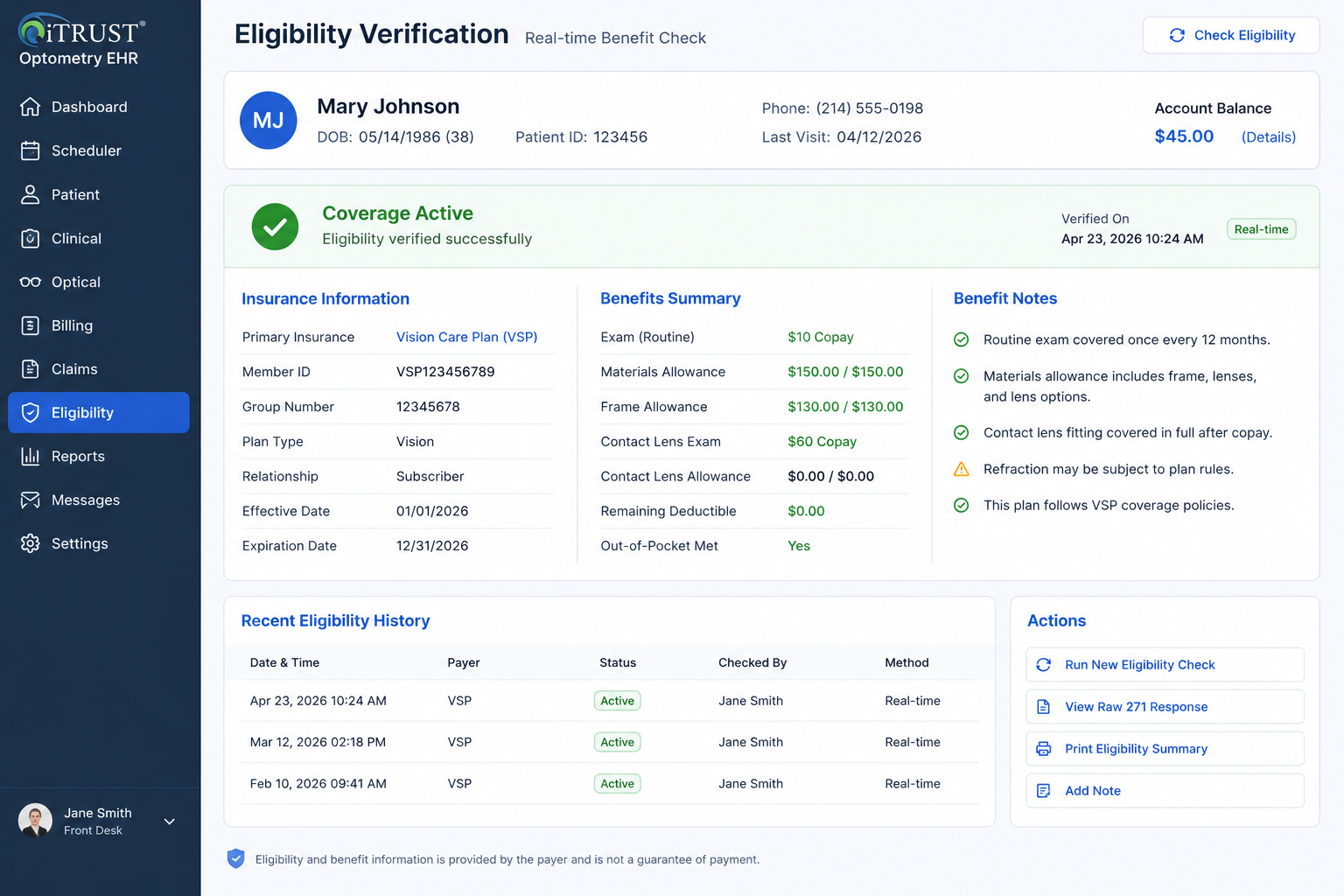
Real-time eligibility verification in optometry EHR softwareStep 2: Eligibility verification should happen before the patient is in the chair
Real-time eligibility verification is one of the most important parts of optometry revenue cycle management.
The eligibility check should help staff understand whether the patient has active coverage, which payer is responsible, what benefit category may apply, whether there is a copay, whether the deductible matters, whether coordination of benefits is needed, and whether prior authorization or referral requirements may affect the claim.
In the broader healthcare system, eligibility and benefit verification is handled through the 270/271 transaction standard. CMS explains that its HETS 270/271 application allows users to submit HIPAA-compliant 270 eligibility requests and receive 271 responses over a secure connection. CMS also notes that HETS supports real-time transactions only, not batch transactions.
For optometry practices, the practical lesson is clear: eligibility should be part of the workflow before care is delivered.
A strong optometry EHR billing workflow should make it easy to:
Run eligibility before the visit
Store the eligibility result
Show the payer response inside the patient workflow
Flag active versus inactive coverage
Identify likely copay or coinsurance
Display benefit notes in a staff-friendly way
Track eligibility errors
Show when verification was last completed
Keep the eligibility record tied to the encounter
Practices should also understand the federal framework behind HIPAA adopted standards for eligibility and benefit verification and the role of CMS HETS 270/271 eligibility transactions.
The point is not just to check a box. The point is to prevent downstream billing friction.
If eligibility is not verified until after the visit, the office may discover too late that the wrong payer was selected, coverage was inactive, a plan required authorization, or the patient owed a responsibility that should have been collected upfront.
Step 3: Check-in should confirm payer type, patient responsibility, and visit purpose
Check-in is where the billing workflow becomes real.
The patient is in the office. Staff are moving quickly. The provider schedule is active. This is where mistakes become expensive.
A strong optometry EHR and practice management system should help staff confirm three things before the exam starts.
First, the practice should confirm the payer path. Is this medical insurance, vision insurance, self-pay, workers’ compensation, managed care, or another plan type?
Second, the practice should confirm the visit purpose. Is the patient here for a routine exam, medical complaint, follow-up, contact lens service, optical pickup, dilation, testing, or something else?
Third, the practice should confirm patient responsibility. Is there a copay, deductible estimate, outstanding balance, noncovered service, refraction charge, contact lens fitting fee, or deposit required?
This is especially important in optometry because the same patient may have both medical insurance and vision coverage, and the right billing path depends on the reason for the visit, payer rules, documentation, and services performed.
The system should not force staff to remember everything manually. It should display prompts, alerts, payer notes, balances, and workflow-specific fields where staff actually need them.
A clean check-in process should reduce the chance that the provider sees the patient under one assumption while the billing team later discovers that the claim needs to be handled differently.
Step 4: Clinical documentation must support billing before charges are created
Billing accuracy depends on documentation.
The provider note should support the service billed. The diagnosis should match the clinical picture. The procedure should make sense based on the exam. Medical necessity should be clear when billing medical insurance. If additional testing is performed, the chart should support why it was ordered.
This is where the EHR matters directly.
A weak EHR lets the provider document the visit but leaves billing to figure out the rest later. A stronger system helps clinical documentation connect naturally to coding, charges, diagnoses, orders, and billing review.
For example, the EHR should help with:
Structured exam findings
Diagnosis selection
Assessment and plan
Procedure documentation
Testing orders
Refraction documentation
Contact lens evaluation details
Medical versus routine visit context
Provider signatures
Clinical notes needed for claim support
Templates that reduce missing information
AI can help here when it is used correctly. A tool like iTRUST AI Doctor Scribe is valuable because documentation speed and completeness affect more than provider convenience. They affect schedule flow, billing readiness, and claim defensibility.
The key is not replacing provider judgment. The key is reducing documentation friction while keeping the provider in control.
Step 5: Coding and charge capture should happen inside the same workflow
After documentation, the next risk point is charge capture.
The claim should not be built from memory. It should be built from the encounter, documentation, payer context, procedure codes, diagnosis codes, modifiers, fee schedule, and practice rules.
Optometry practices commonly deal with CPT codes, HCPCS codes, ICD-10 diagnosis codes, modifiers, refraction charges, contact lens service codes, medical office visit codes, ophthalmic service codes, testing codes, and supply-related workflows.
That is why coding resources matter. The American Optometric Association points doctors and staff to coding and reimbursement resources, including CPT, ICD-10, and HCPCS information specific to optometry through AOA Coding Today.
A strong billing system should help staff avoid common charge capture issues:
Missing charges
Duplicate charges
Unsupported codes
Incorrect modifiers
Wrong diagnosis pointer
Wrong payer rule
Incorrect fee schedule
Noncovered service not handled correctly
Medical and vision services mixed incorrectly
Optical sale separated from the patient responsibility workflow
Practices should also be aware of AOA coding and reimbursement resources and the CMS National Correct Coding Initiative. CMS states that NCCI promotes correct coding methodologies and reduces improper payments for Medicare Part B and Medicaid claims.
The software does not replace payer policy knowledge. But it should reduce avoidable errors by making the correct workflow easier than the wrong one.
Step 6: Optical POS must connect to patient balances, orders, inventory, and payments
Optometry billing is not only medical billing.
The optical side matters just as much.
A patient may finish an exam, receive a prescription, select frames, choose lenses, apply insurance benefits, pay a deposit, use a payment card, and leave with a balance. If the optical POS is disconnected from the EHR and billing system, staff often have to re-enter patient information, duplicate orders, manually reconcile payments, and track balances separately.
That creates errors.
The optical POS should connect to:
Patient record
Prescription
Frame inventory
Lens options
Insurance allowances
Discounts
Deposits
Payment collection
Outstanding balance
Order status
Lab order workflow
Receipts
Refunds or adjustments
Reporting
This is why an optometry practice should not evaluate EHR software only by looking at charting screens. The real workflow includes retail optical operations. The best optometry EHR with integrated billing and POS should make the clinical visit, optical sale, payer responsibility, and patient payment feel like one connected workflow.
For payment security, practices should also understand that payment card standards are separate from HIPAA. PCI Security Standards are maintained to protect payment data throughout the payment lifecycle. Practices using integrated payments should understand how their vendor and payment processor handle cardholder data, tokenization, devices, and PCI responsibilities through PCI Security Standards.
Step 7: Claim generation should be tied to payer rules, documentation, and clearinghouse workflow
Once charges are reviewed, the claim should be generated in a structured, reviewable way.
The claim should pull from the patient record, encounter, provider, location, payer, diagnosis, procedure codes, modifiers, charges, authorization details, and any required supporting information.
For professional claims, CMS’s Medicare Claims Processing Manual explains the framework for electronic claims and EDI support. Chapter 24 notes that EDI for Medicare fee-for-service includes not only claim submission and processing, but also provider EDI enrollment, beneficiary eligibility, coordination of benefits, and security and privacy concerns.
CMS also maintains guidance for completing and processing Form CMS-1500 data through the Medicare Claims Processing Manual Chapter 26.
For an optometry billing workflow, this means claim generation should never feel like a separate spreadsheet exercise. It should be part of the system.
The practice should be able to:
Create claims from completed encounters
Review claim details before submission
See payer and provider information
Confirm diagnosis and procedure alignment
Confirm authorization when required
Submit through the clearinghouse workflow
Track acknowledgments and rejections
Correct claims without starting over
Tie claim status back to the patient and encounter
Practices should understand the broader claim submission framework by reviewing the CMS Medicare Claims Processing Manual Chapter 24 and the CMS Medicare Claims Processing Manual Chapter 26.
A clean billing workflow does not mean every claim gets paid immediately. It means the practice has a structured process to submit, track, correct, and reconcile claims without losing visibility.
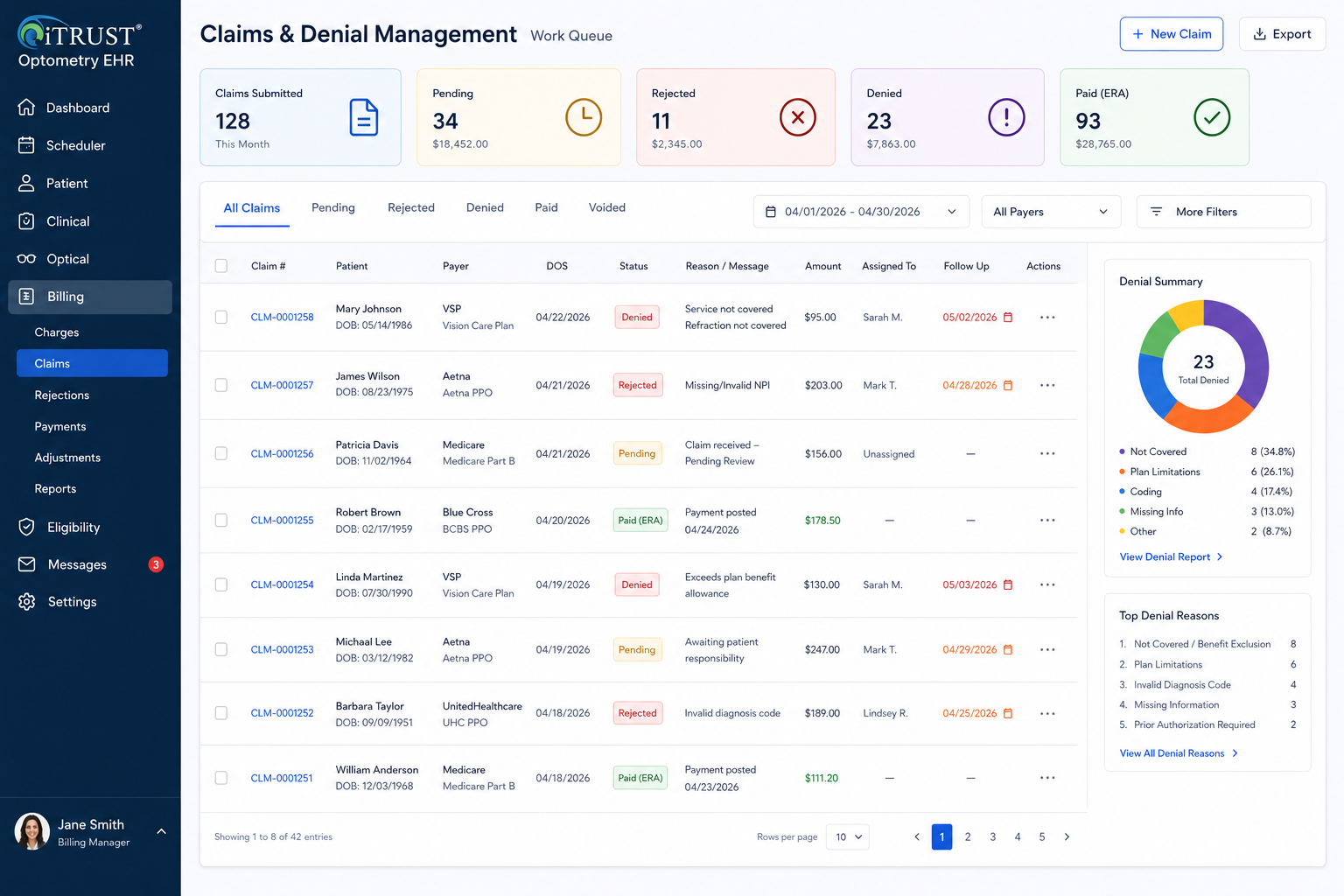
Step 8: Rejections and denials should create work queues, not chaos
Every practice gets rejections and denials.
The question is whether the system turns them into organized work or scattered cleanup.
A rejection usually means the claim did not pass a front-end validation or payer/clearinghouse requirement. A denial usually means the payer processed the claim but did not pay it as submitted. Both need a structured response.
A strong optometry revenue cycle workflow should track:
Claim status
Rejected claims
Denied claims
Reason codes
Missing information
Authorization issues
Eligibility issues
Coding issues
Documentation requests
Assigned staff member
Follow-up date
Corrected claim status
Appeal status
Final resolution
This is where many practices lose money. Not because the denial was impossible to solve, but because no one had a clean queue, owner, timeline, or reporting process.
The future direction of claims support is also moving toward more standardized electronic attachments. CMS finalized a rule establishing HIPAA-adopted standards for healthcare claims attachments and electronic signatures, projecting roughly $781 million in annual healthcare industry savings by reducing manual processes such as faxing and mailing.
That matters for optometry because requests for medical records, imaging, clinical notes, and other supporting documentation can create significant administrative friction. Practices should watch the evolution of CMS health care claims attachment standards because electronic documentation exchange will continue to shape revenue cycle workflows.
The operational takeaway is simple: denials should not live in inboxes, sticky notes, or memory. They should live in structured queues.
Step 9: ERA posting and payment reconciliation should close the loop
The billing workflow does not end when the claim is submitted.
It ends when payment is posted, patient responsibility is updated, adjustments are applied, denials are worked, and the account balance is accurate.
A modern optometry billing system should support electronic remittance workflows, payer payments, patient payments, adjustments, write-offs, secondary billing, and balance transfer.
The cleanest process looks like this:
Claim submitted
Payer responds
ERA/payment information is received
Allowed amount is reviewed
Payment is posted
Contractual adjustment is applied
Patient responsibility is calculated
Secondary claim is generated if needed
Patient statement or payment request is sent
Balance is resolved
Reporting updates automatically
When this workflow is disconnected, staff may collect payment in one system, post insurance payment in another, update patient balances manually, and then reconcile at the end of the day or month. That creates unnecessary leakage.
The broader healthcare industry has already proven that electronic administrative transactions can reduce cost and manual work. CAQH reported that the 2025 CAQH Index found U.S. healthcare avoided an estimated $258 billion in administrative costs in 2024 through electronic transactions and improved data exchange.
That is why practices should pay attention to CAQH administrative automation research. The same principle applies at the practice level: the more structured and connected the workflow, the less time staff spend chasing administrative cleanup.
Step 10: Reporting should show where money is leaking
If the system cannot report on billing performance, the practice cannot improve the billing workflow.
Optometry practices should track more than gross revenue. They should understand where the revenue cycle slows down, where claims fail, which payers create problems, which services are under-collected, and whether staff are collecting patient responsibility consistently.
Useful billing and operational reports include:
Claims submitted
Claims rejected
Claims denied
Denials by payer
Denials by reason
Average days in AR
AR aging by payer
Patient balances
Copays due versus collected
Optical sales
Capture rate
Revenue per patient
Provider productivity
Location-level revenue
Unpaid claims
Unworked denials
Eligibility failures
Authorization-related issues
Refunds and adjustments
Frame and lens sales
Recall and reactivation results
This is especially important for multi-location practices. A single-location office may be able to manage some issues manually. A growing group cannot. Once a practice has multiple locations, providers, billers, and optical teams, reporting becomes a control system.
This is one reason multi-location groups increasingly look for platforms built around reporting, standardization, and scalable workflows. iTRUST has published examples around large multi-state group migration from Revolution EHR and a multi-location optical group with Epic interoperability focus, both of which reinforce the importance of operational consistency as practices scale.
What a connected optometry billing workflow should feel like
A well-built optometry billing workflow should feel boring in the best possible way.
The front desk collects the right information.
Eligibility is checked before the visit.
The patient responsibility is visible.
The provider documents the encounter clearly.
Charges flow from the exam.
The optical order connects to POS.
Payments are tied to the patient and encounter.
Claims are reviewed before submission.
Rejections and denials go into work queues.
Payments post cleanly.
Reports show what needs attention.
That is what “integrated” should mean.
It should not mean that a vendor has a basic interface between two disconnected systems. It should mean the practice can move through the real patient journey without constantly copying, retyping, reconciling, or guessing.
For practices researching optometry EHR systems, features, benefits, and AI-powered workflows, billing integration should be treated as a core requirement, not an add-on conversation.
How to evaluate optometry EHR billing and POS software
Before choosing an optometry EHR, practices should ask workflow-based questions instead of feature-list questions.
Do not only ask, “Does the software have billing?”
Ask:
Can eligibility be checked before the visit?
Can eligibility responses be stored in the patient workflow?
Can staff distinguish medical, vision, self-pay, and optical workflows?
Can copays and patient responsibility be tracked before checkout?
Can the provider documentation support charge capture?
Can the system create claims from completed encounters?
Can claims be reviewed before submission?
Can rejections and denials be assigned to staff?
Can optical POS connect to the patient, prescription, order, inventory, and payment?
Can payments be tied to both insurance and patient balances?
Can reports show denials, AR, unpaid claims, and location-level performance?
Can the system support multiple providers and multiple locations without workflow breakdown?
Can the practice export data if it ever needs to switch systems?
Those questions matter more than a polished demo.
They also matter when comparing systems. Pricing transparency, add-on costs, support, workflow depth, and scalability should all be evaluated together. iTRUST has covered this in articles such as How Much Does RevolutionEHR Cost? and Is Eyefinity Still Relevant in 2026?.
The right system should reduce administrative drag, not create a new layer of software management.
HIPAA, business associates, and billing vendors
Any optometry practice using EHR, clearinghouse, billing, payment, messaging, documentation, or third-party administrative tools must think carefully about compliance and vendor responsibilities.
HHS explains that the HIPAA Privacy Rule requires covered entities to obtain satisfactory assurances from business associates that they will appropriately safeguard protected health information, and that those assurances must be in writing through a contract or other agreement.
In plain English, if a vendor creates, receives, maintains, or transmits protected health information on behalf of the practice, the practice needs to understand the relationship and documentation around that vendor.
That is why practices should review HHS business associate guidance and make sure their software vendors, clearinghouses, billing partners, and related service providers are handled appropriately.
Compliance is not separate from workflow. The more systems a practice uses, the more vendor relationships, access points, data flows, and operational risks it must manage.
A unified platform can reduce fragmentation, but the practice still needs to evaluate vendor security, business associate agreements, access controls, audit logs, and data handling procedures.
Why all-in-one matters for optometry billing
The phrase “all-in-one” gets used too loosely.
For optometry, all-in-one should not just mean the system has many features. It should mean those features work together around the actual flow of the practice.
A true all-in-one optometry EHR and practice management platform should connect:
Scheduling
Patient records
Eligibility verification
Clinical documentation
Coding
Claims
Clearinghouse workflow
Optical POS
Inventory
Payments
Patient communication
Reporting
Denial management
Multi-location oversight
When those pieces are connected, the practice gets fewer handoffs, fewer duplicate entries, fewer billing surprises, and better visibility.
When those pieces are disconnected, the practice may still function, but it depends heavily on staff memory, manual reconciliation, and after-the-fact cleanup.
That is the hidden cost of fragmented software.
The most expensive system is not always the one with the highest subscription fee. Sometimes the most expensive system is the one that causes staff to waste hours every week fixing problems that should have been prevented in the workflow.
Final thoughts: the best billing workflow prevents problems before they become claims
The best optometry billing workflow is not built around fixing claims after they fail.
It is built around preventing avoidable failure before the claim is created.
That means the EHR, eligibility workflow, clinical documentation, coding, optical POS, payment collection, claim submission, denial management, and reporting all need to work together.
For modern optometry and ophthalmology practices, billing is not just a back-office function. It is an operational system that touches the patient journey from scheduling to final payment.
A practice that wants cleaner claims, fewer billing errors, better patient collections, stronger reporting, and smoother growth should evaluate software through that lens.
Not just “Can this system chart an exam?”
But:
Can this system help us run the entire revenue workflow correctly?
That is the real standard for modern optometry EHR and billing software.
FAQ
What is an optometry billing workflow?
An optometry billing workflow is the full process that moves a patient visit from scheduling to final payment. It includes insurance capture, eligibility verification, check-in, documentation, coding, charge capture, optical POS, claim submission, denial management, payment posting, and reporting.
Why should optometry EHR and POS be connected?
Optometry EHR and POS should be connected because eye care practices often combine clinical exams, optical retail sales, insurance benefits, patient payments, and inventory in one visit. If POS is disconnected from the EHR, staff may need to duplicate data, manually reconcile payments, and track balances outside the patient workflow.
What is real-time eligibility verification in optometry?
Real-time eligibility verification allows a practice to check whether a patient has active insurance coverage and benefit information before or during the visit. In healthcare, eligibility and benefit verification commonly uses the 270/271 transaction standard.
How does EHR documentation affect optometry billing?
EHR documentation affects billing because the provider note should support the billed service, diagnosis, testing, and medical necessity. If documentation is incomplete or disconnected from charge capture, the practice may face denials, underbilling, overbilling risk, or delayed claim processing.
What should optometry practices track in billing reports?
Optometry practices should track claims submitted, rejections, denials, denial reasons, AR aging, copays due versus collected, patient balances, payer performance, revenue per patient, optical sales, capture rate, and location-level reporting.
What is the best optometry EHR with billing and POS?
The best optometry EHR with billing and POS is the system that supports the full eye care workflow: scheduling, eligibility, clinical documentation, claims, optical POS, payments, inventory, reporting, and patient communication. Practices should test real workflows before choosing a platform.
References and Link Placements
- iTRUST Optical and Optometry EHR
- Optometry EHR Software in 2026: What Modern Eye Care Practices Actually Need
- How to Reduce Optical Billing Errors
- What EMR Do Optometrists Use in 2026?
- CMS HIPAA Adopted Standards and Operating Rules
- CMS HETS 270/271 Eligibility Transaction System
- iTRUST AI Doctor Scribe
- AOA Coding and Reimbursement Resources
- CMS National Correct Coding Initiative
- PCI Security Standards
- CMS Medicare Claims Processing Manual Chapter 24
- CMS Medicare Claims Processing Manual Chapter 26
- CMS Health Care Claims Attachments Final Rule
- CAQH 2025 Index Administrative Automation Research
- iTRUST Optometry EHR Systems: Features, Benefits, and AI
- How Much Does RevolutionEHR Cost?
- Is Eyefinity Still Relevant in 2026?
- iTRUST Case Study: Large Multi-State Group Migration from Revolution EHR
- iTRUST Case Study: Multi-Location Optical Group in Texas
- HHS HIPAA Business Associate Guidance